
Candidates
Manage and view candidate information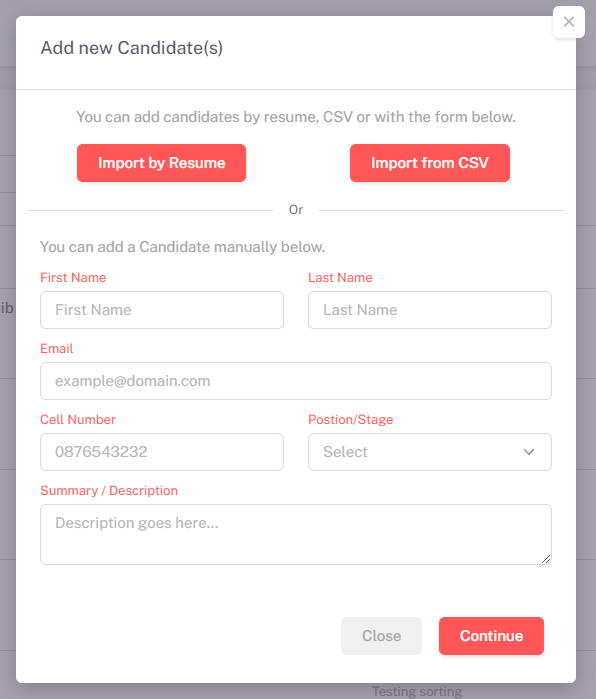
Add New Candidates
You can add candidates manually by entering their details, or you can choose to import candidates either by Resume/CV or via CSV files. This gives you the flexibility to input candidates one at a time or in bulk for faster data management.
Manually Add Candidates: Fill out the form fields for first name, last name, email, and more, then click Continue to save the candidate details.
Import Resumes/CVs: Upload individual resumes in supported formats to quickly add candidates.
Import CSV: Upload a CSV file to bulk add candidates by providing data for each candidate in a predefined structure.
Recently updated
Assessments
Manage and assign assessments to candidates
Create and Assign Assessments
In this section, you can create new assessments and assign them to candidates. Each assessment can be customized with specific questions and difficulty levels to evaluate the candidate's skills and knowledge.
Once assigned, candidates will be notified and provided a link to complete the assessment. After completion, the assessments will be automatically graded. You'll have access to the grades and detailed results for each candidate, enabling you to make informed decisions during the hiring process.
Create Assessments: Use the "Add New Assessment" button to create tailored assessments, define the difficulty level, and set the start and end dates for candidate submissions.
Assign Assessments: Assign assessments to one or more candidates by linking the assessment to their profiles. You can monitor their progress and completion status in real-time.
Grading: After the candidates complete their assessments, the system will automatically grade them and provide the results. You can review the scores and add any additional feedback as needed.
Recently updated
Vetting
Screen candidates and verify their credentialsVetting Process
The vetting process ensures that candidates meet the necessary requirements for your open positions. This includes verifying personal information, educational credentials, work history, and conducting background checks.
Background Checks: Conduct thorough background checks to confirm candidates' criminal records, employment history, and references to validate their suitability for the role.
Reference Verification: Contact references to ensure the validity of the candidate’s professional and personal claims.
Education & Certification Verification: Validate the education and certification credentials provided by the candidate.
With our comprehensive vetting feature, you can confidently move forward with candidates who are a true fit for your organization.
Last updated 5 mins ago
Schedule Interviews
Schedule and manage candidate interviews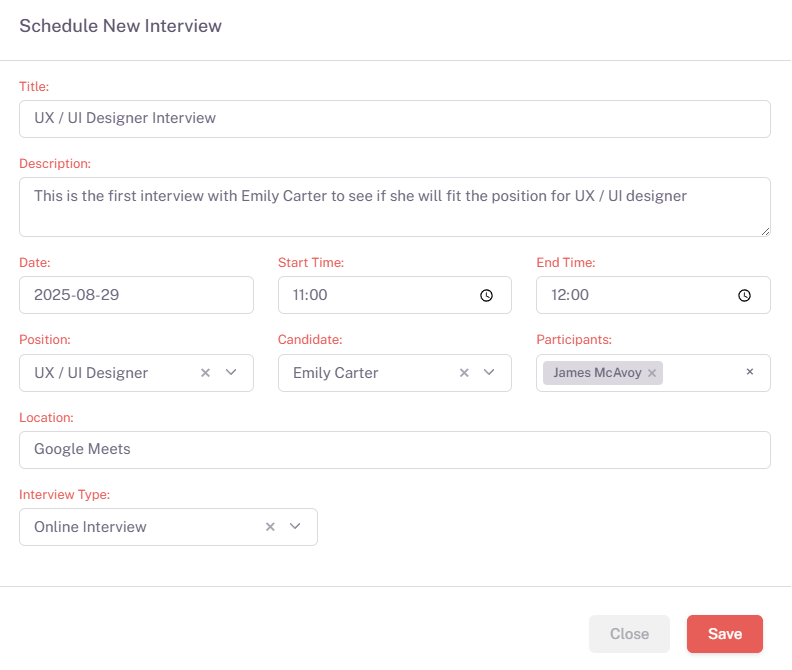

Schedule Interviews
Scheduling interviews is an essential part of your recruitment process. You can quickly schedule an interview by filling out the details, including title, description, participants, and the interview date and time.
Set Interview Date & Time: Specify the interview date, start time, and end time to ensure participants are aligned and prepared for the interview session.
Select Candidate and Participants: Choose the candidate and assign participants for the interview. You can also assign interviewers to specific positions.
Choose Interview Type: Decide whether the interview will be held offline, online, or using an external meeting link.
Once all details are filled out, click Create Interview to add it to the calendar, and manage it easily from the scheduling interface.
Last updated a few moments ago
HR
Manage key HR tasks: Performance, Onboarding, and OutboardingPipeline Management
Streamline your recruitment workflow with customized pipelines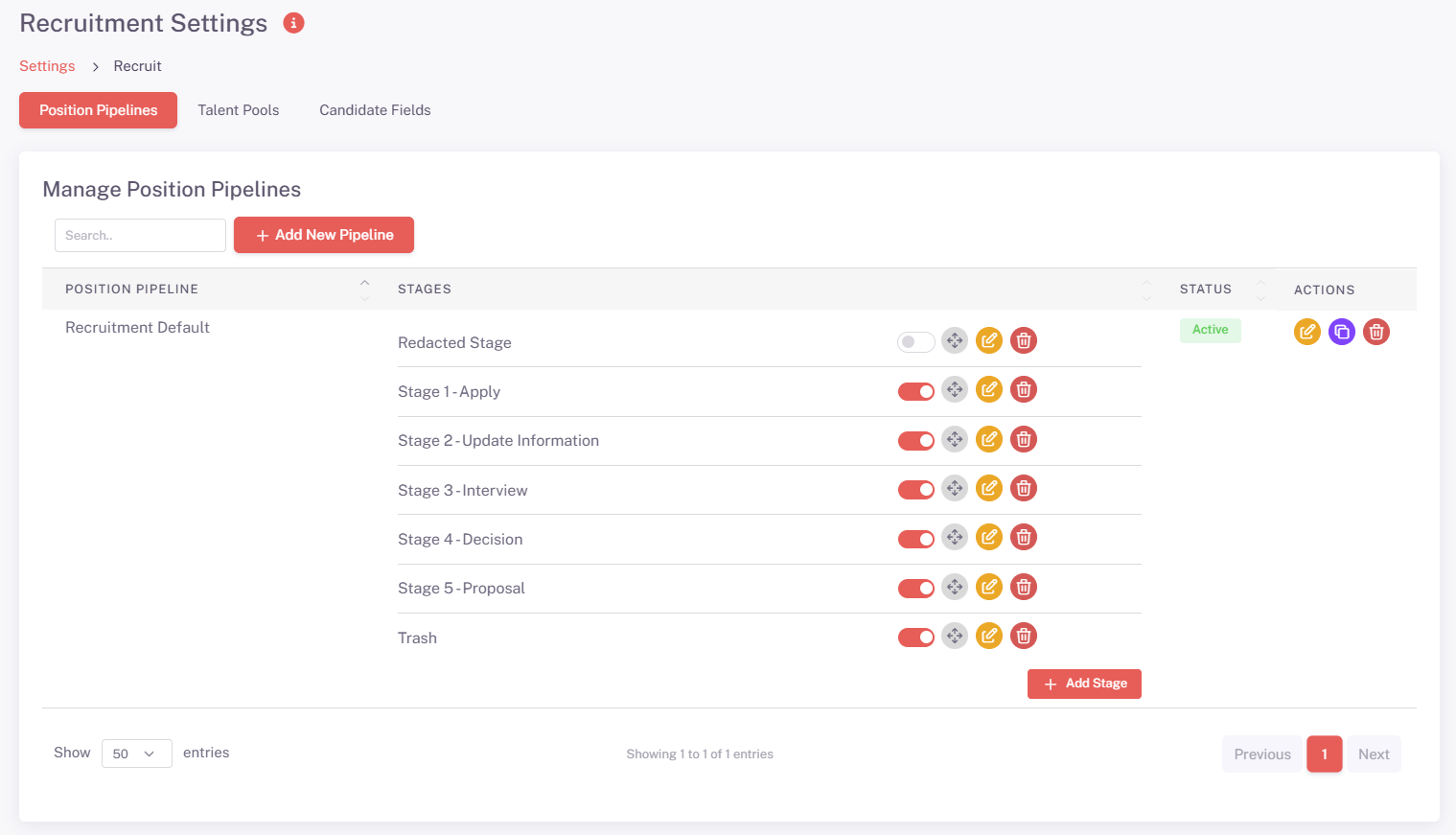
Manage Recruitment Pipelines
Our pipeline management feature enables you to create and customize recruitment pipelines that suit your organization's specific hiring process. This ensures that you have complete visibility of where candidates are in the process, from application to final offer.
Create Custom Pipelines: Design multiple recruitment stages such as Application Review, Interview, Assessment, and Offer. Tailor each pipeline to fit different roles or departments.
Track Candidate Progress: Move candidates through each stage of the pipeline seamlessly and track their status in real-time.
Automated Notifications: Set up automated notifications to keep candidates and hiring managers updated as they progress through each stage of the pipeline.
Data-Driven Decisions: Use pipeline analytics to identify bottlenecks, improve hiring speed, and make data-driven decisions about candidate selection.
Last updated a few moments ago
Roles & Permissions
Manage user roles and permissions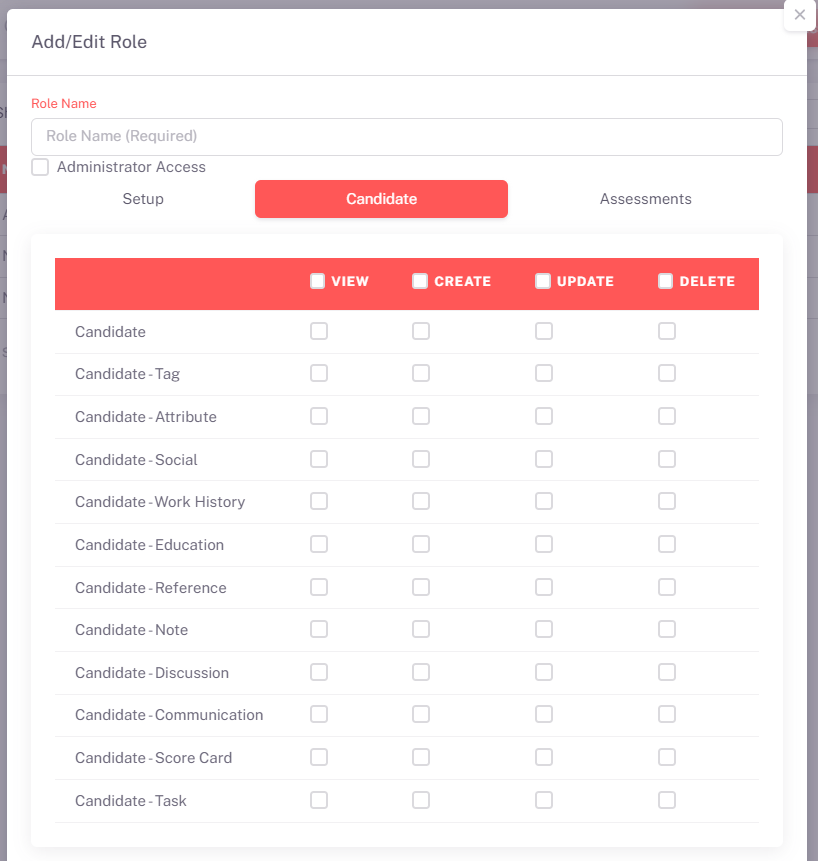
Manage Roles & Permissions
In this section, you can assign various roles to users within the system. Roles can be customized with different levels of administrative access, allowing you to control what users can view, create, update, or delete.
Role Creation: Use the "Add New Role" option to create custom roles that fit your organizational needs. Define permissions for specific areas such as Candidates, Assessments, and System Settings.
Assign Permissions: Assign permissions for each role. You can grant or restrict access to specific modules, allowing users to view, create, update, or delete records as needed.
Administrator Access: You can assign full administrative access to certain users, giving them complete control over the system. This is ideal for system administrators who need comprehensive access to manage all users and settings.
Recently updated